![[How To] Install Brightery Facebook Business Scraper](https://www.brightery.com/cdn//cached/blog/brightery_1_1467327220_545529_orig_1000x760.webp)
How to install Brightery Facebook Business Scraper :
you should follow this steps carefully and be sure doing it the right way.
after downloading and extracting files you get a copy of ( Brightery Facebook Business Scraper ) script containing these files: -
Step one: Upload
you're now fine, you have to upload those files into your cloud service (hosting) to start scraping data from facebook.
Step two: permissions
you should change your containing folder permission to these
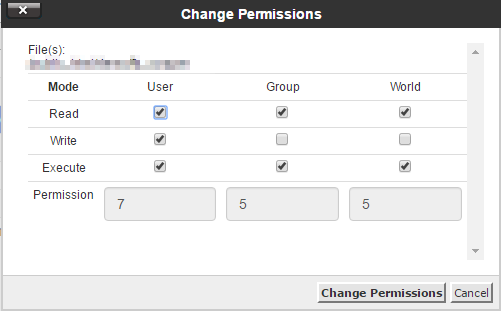
you should change your files permission to these

Step Three: set up application
set up facebook application and get id/secret, You should go to Facebook Developers area and watch video below and follow steps
to enable user, group and event search follow this step
Step four: config.php
version 1 and 2
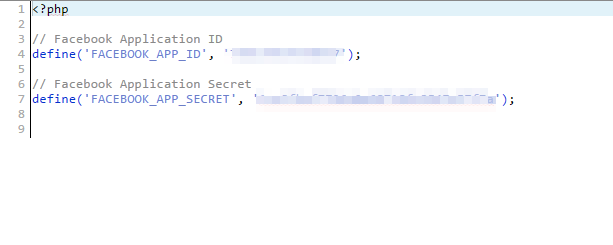
we're almost done now, go to your hosting/containing folder/config.php file and start editing, then place your app id and secret to the secound parameters as you see in picture
version 3
Config your fb apps, we support multiple fb apps to increase graph api call limitations
Example: for a single app
return [
[
'app_id' => 'xxx',
'app_secret' => 'xxxxx'
]
];
Example: for 3 apps
return [
[
'app_id' => 'xxx',
'app_secret' => 'xxx'
],
[
'app_id' => 'xxx',
'app_secret' => 'xxx'
],
[
'app_id' => 'xxx',
'app_secret' => 'xxx'
],
];
I am working with "Page" result of facebook with your Brighter scraper. How can I set default value 0 if any result of a field is blank.
Dear Mr.Raffie,
we need more information about the problem you're facing..
Please send us detailed problem attached with print screens if you can.
Best Regards,
Adam Yassin
Goodmorning,
When i configure and run the script it don't stop to charge, so i think it come from the permissions.
I can't see photos for install your script (like this one : http://demo.brightery.com.eg/tutorials/facebookdatascrapper1.PNG and this one http://demo.brightery.com.eg/tutorials/facebookdatascrapper2.PNG )
Thank you.
Hello,
Please contact our support at [email protected] to check your problem and fix it
Thanks
Hi,
I tried to follow the tutorial but the facebook interface has completely changed so i was unable to configure the application.
Can you help me?
Sure, just send email for support at brightery.com.eg
Thank you
Is this the correct code for the config file? The pic above uses define ( 'Facebook_app_id','enter my id$'); but where does this go... in a separate config file than the below code? Help...
The only config file i edited was the code below inside the folder containing all of the scraper files...
the config file depends on the version you are using, but if you mention for version 1 and 2, so it must look like the following:
define ( 'FACEBOOK_APP_ID','2323232323232323');
define ( 'FACEBOOK_APP_SECRET','1212121212121212121212121212');
where "2323232323232323" and "1212121212121212121212121212" is your fb app variables.
Thanks
so do we simply set up three different apps - how many apps do we need to set up to scrap users, places, pages, events - no real example above - right now i can only search pages - works great but i would like to try users and events but not sure how to allow them... or where and what kind of app is needed...
Hello,
One app is enough to scrap anything, multi app support is just to increase the api call limits.
You issue related to the fb app configuration, please follow step 3 (to enable user, group and event search follow this step) above
https://www.youtube.com/watch?v=9a-S0Tus1Gk
Thanks
Hi is this safe or will FB ban me or close my account for scraping their system?
it's safe and legally 100%
when I am searching for groups lot of pop ups are opening why I am facing this problem
hello sir,
i install successfully but it is not working properly ,
page and place working fine but remaining are not working(like Group,user and event).
i had given permission to folder as per your document that is 755 and for files 644.
but still i am facing same problem.
thanks regards
How can the data be exported in normal excel format and not the CSV file.
Hello,
It's not supported, but you can order for any modification anytime
Thanks
mi sitio no funciona my web not function help me
You just need to delete your browser cookies.
Hi, I would like to buy Facebook scrapper, but dont know if I can apply the idea. I want to add it at my website so my visitors can use it at my website is that possible? what license should I need? thanks, if i can i will buy others as well to plug in my website...thanks
Hi. I've sent you an email. Thank you.
I've follow all your steps, I still getting these message...
Your app is not configured correctly, please check the installation tutorial from https://www.brightery.com.eg/en/post/how-to-install-brightery-facebook-business-scraper, or you can order for a professional installation service
I was looking for app has this functionalty, so it's a great fb scraper, I wish you make a twitter clone
its the best scraper i ever bought
Hello,
I bought your facebbok scrapper and install it inside my wordpress, and already get the FB ID & FB Scret
So then what shoukd I do? Because I dont see any features / menu inside my dashboard WP?
Thanka