
Some people asking how can I open a ticket, It doesn’t require any experience but life is short and we don’t like to waste a minute searching or guessing for this minor things.
That why we write this tiny tutorial.
First you have to get register an account on our website to follow up your ticket status and reply when ever you want, also getting notification when you got a response.
To create your account, you have to click this icon

Then Login if you already registered, or click on register my account if you already don’t have account

Fill in the registration form and register.
Now, You already have an account, and logged in, it’s time to create the ticket.
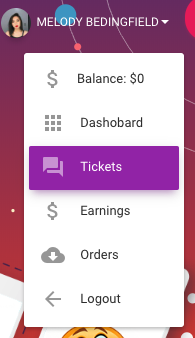
The icon of login/register will transform to your image to avatar beside your name when you’re logged in, just like that

Click over it and select tickets
Here you can see old, in progress and solved tickets, and you can open a new ticket by clicking over this button

I hope you enjoy our support system and get a satisfied and happy from our services.
0 Responses
Share your perspective and continue the conversation.
No responses yet
Be the first to share your thoughts.
Join the conversation