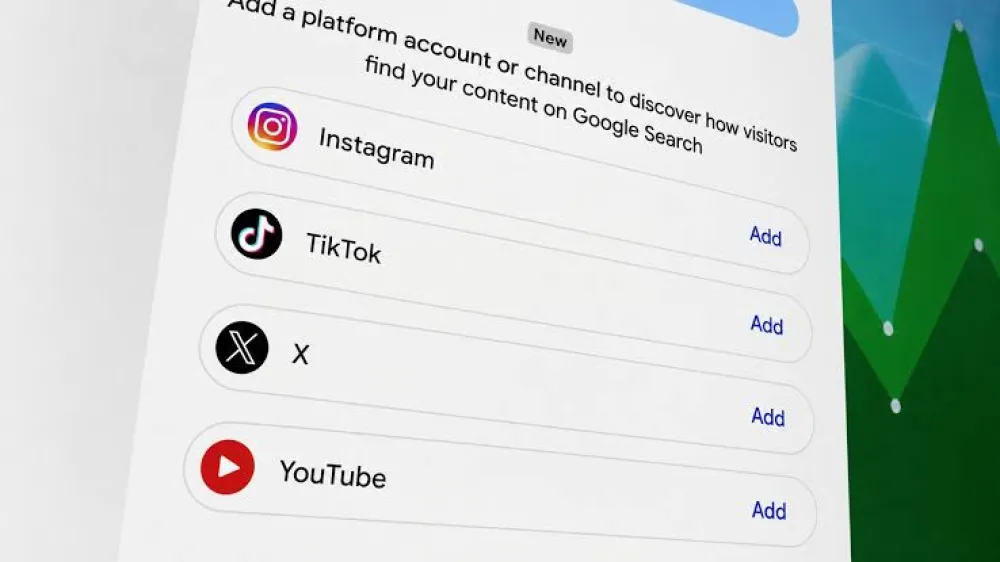
Google Search Console social platform tracking allows creators, brands and publishers to measure how their Instagram, TikTok, X and YouTube content performs when it appears across Google Search, Discover and Google News.
Google Search Console is no longer limited to measuring content published on a website you control.
Google has introduced a new property type called Platform Properties, allowing eligible users to add supported social and video accounts directly to Search Console.
This creates an important new connection between search-engine optimization and social media marketing.
Marketers can now answer questions such as:
- Which Google searches lead users to our YouTube videos?
- Which Instagram posts receive impressions in Google Search?
- Is a TikTok video attracting clicks from Google?
- Which social posts are growing or declining in search visibility?
- Which countries send Google Search traffic to our social profiles?
- Does social content appear in Discover or Google News?
However, the name can also create confusion.
Google Search Console social platform tracking does not show every view, impression, like or comment that happens inside Instagram, TikTok, X or YouTube.
It specifically measures how people discover and interact with supported social content through Google’s search and discovery surfaces.
The Feature in One Sentence
Platform Properties show how supported social and video content performs on Google—not how it performs inside the social platform itself.
Table of Contents
- What Did Google Announce?
- What Are Platform Properties?
- Which Social Platforms Are Supported?
- What Can You Track?
- Available Search Console Reports
- How to Add a Social Platform Property
- The 2025 Experiment vs the 2026 Feature
- What the Feature Does Not Track
- Search Console vs Native Analytics vs GA4
- Why This Matters for SEO
- Why This Matters for Social Media Teams
- How to Use the Data in Your Content Strategy
- Instagram, TikTok, X and YouTube Strategies
- A Practical Reporting Workflow
- Current Limitations
- Troubleshooting Platform Properties
- How Brightery Can Help
- Related Brightery Guides
- Frequently Asked Questions
What Did Google Announce?
On July 7, 2026, Google announced a new Search Console property type for social and video accounts.
The feature is called Platform Properties.
It allows creators and publishers to add supported accounts as individual properties inside Google Search Console.
Once connected, Search Console can report how the account’s public content performs across Google.
Google described the feature as a way to help creators and site owners understand how content published beyond their websites is discovered through Search.
Why Google Introduced It
Brands no longer publish exclusively on their own websites.
A company may publish:
- Detailed articles on its website
- Short videos on TikTok
- Reels and posts on Instagram
- Updates and commentary on X
- Tutorials and interviews on YouTube
Some of that social content can appear directly in Google Search, Discover, video results, image results and other Google experiences.
Until now, creators had limited first-party Search Console visibility into how those externally hosted posts performed.
What Are Google Search Console Platform Properties?
A property is an asset that can be viewed and managed inside Google Search Console.
Traditionally, properties represented websites.
A website property could cover:
- An entire verified domain
- A specific URL prefix
- A particular subdomain or website section
Platform Properties expand that model to supported social media profiles and video channels.
A property can now represent an account such as:
- An Instagram profile
- A TikTok account
- An X profile
- A YouTube channel
Each account is added as an independent property.
A business managing several brands, regional profiles or channels must create a separate Platform Property for each eligible account.
You Do Not Necessarily Need a Website
One of the most important changes is that creators without their own website may still be able to use Google Search Console.
They can add and verify a supported social or video account directly.
This makes Search Console relevant to independent creators, video publishers, influencers and social-first businesses—not only website owners.
Which Social Platforms Does Search Console Support?
At launch, Google Search Console social platform tracking supports four platforms.
| Platform | Supported in 2026? | Example Content |
|---|---|---|
| Yes | Profiles, posts, Reels and eligible Stories | |
| TikTok | Yes | Public videos, profiles and indexed content pages |
| X | Yes | Profiles, public posts and indexed conversations |
| YouTube | Yes | Channels, videos, Shorts and eligible content pages |
| Not included in the current supported list | Not available as a Platform Property at launch | |
| Not included in the current supported list | Not available as a Platform Property at launch |
Google may expand the list later, but businesses should not assume that an unsupported platform can already be connected.
What Can Google Search Console Social Platform Tracking Measure?
The new Platform Properties provide familiar Search Console metrics for eligible social content.
Total Clicks
Clicks show how many times users clicked from Google to the connected social account or its content.
Google may count a click even when a supported video opens inside a Google viewer rather than immediately opening the original platform.
Total Impressions
Impressions indicate how often eligible content was displayed or potentially seen on a supported Google surface.
For example, an indexed Instagram Story can receive an impression when it appears in Google Search.
Average Click-Through Rate
CTR is calculated by dividing clicks by impressions.
It can help identify content that appears frequently but does not persuade users to click.
Average Search Position
Average position shows the approximate ranking position of content across Google Search results.
Position applies to Google Search and does not represent ranking inside Instagram, TikTok, X or YouTube.
Search Queries
Platform Properties can show search terms that led people to supported social content.
This may reveal:
- Brand-name searches
- Product searches
- How-to questions
- Review searches
- Location-related searches
- Industry topics
- Trending questions
Top-Performing Posts
Marketers can review which individual posts, videos or content pages receive the strongest Google Search visibility and traffic.
Content Trends
The Insights report can identify content whose search performance is increasing or decreasing.
Audience Countries
Search Console can show the leading countries from which users click social content through Google.
Which Reports Are Available for Platform Properties?
Google currently describes three main reporting experiences.
1. Performance Report
The Performance report provides detailed data about:
- Clicks
- Impressions
- Average CTR
- Average position
- Queries
- Individual content pages
- Countries
- Google surfaces
Users can filter and sort the information to identify specific posts and queries contributing to performance.
Search Console also provides options to export report data for further analysis.
2. Insights Report
Search Console Insights provides a faster, high-level overview.
It can show:
- Recent traffic trends
- Top-performing content
- Content growing or declining
- How users discover the account through Google
- Top countries
The main summary may include clicks from web, image, video and news searches.
More detailed cards may focus specifically on web search, so totals across report sections may not always match.
3. Achievements
The Achievements area tracks click-based milestones.
For example, Search Console may recognize when a Platform Property reaches a new threshold of Google Search clicks within a recent period.
Discover and Google News Reports
Discover and News reports only appear when the connected content receives sufficient activity from those Google surfaces.
The absence of a report does not necessarily indicate a technical error.
How to Add a Social Platform Property to Search Console
The setup process is designed to verify that the user controls the selected social account or channel.
1. Open Google Search Console
Sign in using the Google account that should manage the property and its reports.
2. Open the Property Selector
Use the property dropdown in the Search Console sidebar and select “Add property.”
3. Choose the Platform Property
Select Instagram, TikTok, X or YouTube from the available supported platform options.
4. Authorize the Connection
Follow the secure login and authorization instructions provided for the selected platform.
5. Verify Ownership
Google must confirm that the connecting user controls the account or has suitable access.
6. Open the New Property
After verification is complete, select the Platform Property from the Search Console property list.
7. Allow Time for Data
It may take several days for performance information to begin appearing.
Adding Several Accounts
Repeat the process for every account or channel.
For example, a company with two Instagram profiles, three YouTube channels and one TikTok account will need separate properties.
Keep the Authorization Active
Google periodically checks ownership and access for security.
If the connected social login expires or loses authorization, access to the Platform Property may be paused until the account is verified again.
Re-verification should restore access to the existing report rather than creating a completely new property history.
The December 2025 Experiment vs the July 2026 Launch
The current feature developed from an earlier Search Console experiment announced on December 8, 2025.
The Earlier Social Channels Experiment
The original test expanded Search Console Insights for a limited number of websites.
Google automatically identified certain social channels associated with a verified website and invited the owner to include them in its Insights view.
That experiment offered a combined view of website and social-channel visibility.
The New Platform Property Model
The July 2026 announcement turns social accounts into individual Search Console properties.
Important differences include:
- Users can add supported accounts directly
- Each account receives an independent property
- Creators without websites can participate
- Detailed Performance reports are available
- Ownership is verified through platform authorization
- Users can export performance data
| Feature | 2025 Experiment | 2026 Platform Properties |
|---|---|---|
| Primary format | Social data inside website Insights | Independent Search Console property |
| Account identification | Automatically associated by Google | Added and verified by the user |
| Website required | Initially connected to verified sites | Not necessarily required |
| Detailed report | Limited Insights experiment | Performance, Insights and Achievements |
| Availability | Very limited experiment | Gradual wider rollout |
What Google Search Console Social Tracking Does Not Measure
Platform Properties are not a replacement for Instagram Insights, TikTok Analytics, X Analytics or YouTube Studio.
It Does Not Show Native Social Impressions
If a TikTok video is viewed one million times inside TikTok, those native views will not appear as one million Search Console impressions.
It Does Not Show Every Social Engagement
Search Console does not provide native platform metrics such as:
- Likes
- Comments
- Shares
- Saves
- Follower growth
- Profile interactions inside the platform
- Native video completion rate
- Platform-specific watch time
It Does Not Measure Social Referral Traffic to Your Website
Search Console measures clicks from Google to the social content.
To measure users moving from Instagram, TikTok, X or YouTube to your own website, use website analytics such as Google Analytics with suitable campaign parameters and attribution controls.
It Does Not Control Indexing on the Social Platform
Adding an account to Search Console does not guarantee that every social post will be indexed or ranked.
Google still decides which publicly accessible content is crawled, indexed and shown.
It Does Not Guarantee More Google Visibility
Connecting a property enables measurement.
It does not directly improve ranking or force content to appear in Search or Discover.
Search Console vs Native Social Analytics vs Google Analytics
Businesses need all three data sources because they answer different questions.
| Tool | Main Question Answered | Example Metrics |
|---|---|---|
| Google Search Console Platform Properties | How does our social content perform across Google? | Google clicks, impressions, CTR, position, queries and top posts |
| Native Social Analytics | How does the content perform inside the platform? | Native reach, engagement, followers, watch time and audience behavior |
| Google Analytics | What do users do after arriving on our website? | Sessions, leads, purchases, engagement, conversions and revenue |
Example Measurement Journey
- Search Console shows that a TikTok video receives clicks for the query “best CRM for small business.”
- TikTok Analytics shows how users engage with the video inside TikTok.
- Google Analytics shows whether users clicking the profile’s website link later submit a form or request a consultation.
None of these tools provides the complete journey alone.
Why Platform Properties Matter for SEO
Google Search Console social platform tracking expands SEO beyond traditional website pages.
Search teams can now evaluate how content hosted on major platforms contributes to search visibility.
Social Posts Can Satisfy Search Intent
A short video, product demonstration, interview or visual tutorial may answer some searches more effectively than a long webpage.
Platform data helps marketers identify the format Google users appear to prefer for particular queries.
Find New Website Content Opportunities
A social post receiving impressions for a valuable query may indicate an opportunity to create:
- A detailed website article
- A service page
- A product comparison
- A downloadable guide
- A supporting FAQ section
- A longer YouTube tutorial
Identify Search Demand Earlier
Social content can be created quickly around new questions and trends.
When a post begins gaining Google impressions, the SEO team can decide whether to invest in a larger content cluster.
Measure Brand Search Visibility
Marketers can review whether branded searches lead users to the company website, Instagram profile, YouTube channel or another supported account.
Improve Cross-Channel Content Planning
The same topic can be developed across:
- A search-optimized article
- An Instagram carousel
- A TikTok explanation
- An X discussion
- A complete YouTube tutorial
Search Console helps reveal which format gains visibility for different types of searches.
Why Search Console Social Platform Tracking Matters for Social Teams
Social teams commonly optimize content using native reach, engagement and follower metrics.
The new Search Console feature introduces another performance layer: long-term discovery through Google.
Social Content Can Continue Working After Publication
A post may stop receiving strong native distribution but continue appearing for relevant Google searches.
Search Console can help identify those durable posts.
Search Queries Reveal Audience Language
Queries show the words people use before finding social content.
This may improve:
- Video titles
- Captions
- On-screen text
- Content hooks
- Descriptions
- Future topic selection
Content Can Be Evaluated Beyond Likes
A post with modest native engagement may still attract valuable search visibility.
Conversely, a viral post may generate little ongoing Google discovery after the trend ends.
SEO and Social Teams Need Shared Reporting
The feature creates a practical reason for SEO and social teams to review performance together rather than operating through separate content calendars.
How to Use the New Data in Your Content Strategy
1. Identify High-Impression, Low-CTR Content
A post receiving many Google impressions but few clicks may need:
- A clearer title
- A stronger description
- More relevant opening text
- A better thumbnail
- A closer match with the search query
The exact elements Google displays depend on the content type and platform.
2. Expand Posts That Already Perform
When a social post gains clicks from a commercially relevant query, develop the idea further.
Possible expansions include:
- A longer video
- A supporting website article
- A downloadable checklist
- A case study
- A product or service landing page
3. Compare Brand and Non-Brand Discovery
Separate searches containing the company name from broader informational and commercial searches.
Branded queries indicate existing awareness.
Non-branded queries show whether content reaches users who may not already know the company.
4. Review Search Performance by Country
Country data can help determine whether content is reaching intended markets.
A UAE company receiving strong social-search visibility from unrelated markets may need better localization and topic targeting.
5. Monitor Content Decline
Falling clicks or impressions may indicate:
- Reduced search demand
- Increasing competition
- Outdated information
- A newer post replacing the old result
- Changes in Google presentation
Refresh the content only when an update improves its value.
How to Use Platform Property Data for Each Network
Instagram Search Performance
Review which posts, Reels, profile pages and eligible Stories gain Google visibility.
Use the findings to improve:
- Profile positioning
- Post captions
- Content topics
- Reel titles and opening text
- Visual explanations
TikTok Search Performance
TikTok content often answers direct questions through short video.
Use Search Console queries to find questions that deserve:
- A clearer video answer
- A follow-up video
- A complete tutorial
- A related website article
X Search Performance
X posts may perform around current events, commentary, technical discussions and expert opinions.
Search data can reveal which public discussions continue attracting discovery after the original conversation slows down.
YouTube Search Performance
YouTube creators already have detailed information in YouTube Studio.
Search Console adds a Google-wide view that can include eligible Search, Discover and News performance.
Compare the data with YouTube Studio to distinguish Google discovery from discovery occurring within YouTube.
A Practical Monthly Reporting Workflow
1. Review Total Search Visibility
Compare clicks, impressions, CTR and average position with the previous period.
2. Review the Leading Queries
Group queries by brand, product, information, location and commercial intent.
3. Review Top Social Posts
Identify posts attracting meaningful Google visibility and the searches associated with them.
4. Review Growing and Declining Content
Determine whether changes reflect demand, content freshness, seasonality or competition.
5. Compare Native Platform Data
Add native reach, engagement and audience information from the relevant social network.
6. Review Website Outcomes
Use Google Analytics and CRM data to determine whether social visitors later become leads or customers.
7. Create Content Actions
Assign specific improvements, repurposing opportunities and new content topics for the next period.
Recommended Dashboard Sections
- Website Google Search performance
- Instagram Google Search performance
- TikTok Google Search performance
- X Google Search performance
- YouTube Google Search performance
- Native social metrics
- Website leads and conversions
- Content actions and owners
Current Limitations of Platform Properties
The Rollout Is Gradual
The option may not yet appear in every Search Console account.
Only Four Platforms Are Supported
Instagram, TikTok, X and YouTube are currently listed. Facebook and LinkedIn are not part of the initial supported list.
Data Begins After Setup
New properties may initially show empty or partial reports.
Google states that processing can take several days.
The Default Reporting Period Is 28 Days
Both Insights and Performance reports use a 28-day default range, although users may adjust dates where reporting controls allow.
Not Every Query Is Displayed
As with website Search Console data, privacy protections and reporting thresholds may prevent every query from appearing.
Discover and News Need Eligible Traffic
Those reports only appear when the property receives suitable activity from the relevant Google surface.
Performance Is Reported Per Property
Businesses managing many profiles must review or export several independent properties to create a consolidated report.
Troubleshooting Google Search Console Platform Properties
The Add Platform Option Is Missing
The feature is being rolled out gradually.
Keep Search Console access active and check the property selector again later.
Verification Fails
Confirm that:
- You are logging into the correct social account
- You have sufficient account permissions
- Popups and external authentication are not blocked
- The account is on a supported platform
- The browser session has not expired
No Data Appears
New properties may require several days before reports populate.
The account must also have content appearing in Google to generate impressions and clicks.
The Connection Stops Working
External platform authorization can expire.
Reconnect and verify the account to restore report access.
The Numbers Do Not Match Native Analytics
This is expected.
Search Console measures activity across Google, while native platform tools measure activity inside the social application.
How Brightery Can Help With Social Search Tracking
The new feature is most useful when Search Console data becomes part of a complete content and conversion strategy.
Brightery can help businesses connect:
- Google Search Console website properties
- Social Platform Properties
- Native social media analytics
- Google Analytics
- Content-performance reports
- SEO keyword and topic research
- Lead and CRM reporting
Platform Property Setup
Brightery can assist with property planning, account access, verification and reporting structure.
Search and Social Content Strategy
We can use queries and post-performance data to create connected website, video and social content clusters.
SEO Reporting
Search Console data can be combined with website, social and business metrics to create more useful management reporting.
Content Optimization
Search insights can guide content titles, captions, video topics, website articles and regional content plans.
Related Brightery SEO and Social Media Guides
- What Is Google Search Console?
- The Complete Guide to SEO Marketing
- How to Write SEO Content for Your Website
- Brightery Social Media Management Services
- Brightery Digital Marketing Services
- Marketing With Artificial Intelligence
- SEO Web Design and Search-Friendly Development
- Social Media Marketing Agency Guide
Final Thoughts
Google Search Console social platform tracking is an important change in how brands measure organic discovery.
Search performance is no longer limited to content hosted on the company’s website.
Instagram posts, TikTok videos, X content and YouTube videos can now be evaluated as independent Search Console properties.
The feature helps marketers understand:
- Which social posts appear on Google
- Which queries produce impressions and clicks
- Which social content grows or declines
- Which countries discover the account
- Which topics deserve additional investment
It should not be treated as a replacement for native social analytics or website analytics.
The strongest measurement strategy combines all three:
Search Console explains discovery through Google, native analytics explains engagement inside the platform, and website analytics explains the business outcome.
Businesses that combine these data sources will gain a clearer picture of how social content contributes to search visibility, audience growth and customer acquisition.
Frequently Asked Questions
What Is Google Search Console Social Platform Tracking?
It is a new Search Console capability that measures how supported Instagram, TikTok, X and YouTube content performs across Google Search and eligible Google discovery surfaces.
What Is a Search Console Platform Property?
A Platform Property represents a supported social media account or video channel that has been verified and added to Google Search Console.
Which Social Platforms Are Supported?
Google currently supports Instagram, TikTok, X and YouTube. Facebook and LinkedIn are not included in the initial supported list.
Does Search Console Track Instagram Views?
It tracks eligible impressions and clicks occurring across Google. It does not report every native view or impression occurring inside Instagram.
Does Search Console Track TikTok Performance?
It can show how eligible TikTok content performs through Google, including clicks, impressions, CTR, position, queries and top-performing content.
Can YouTube Be Added to Search Console?
Yes. Eligible users can add and verify a YouTube channel as a Platform Property.
Do I Need a Website to Use Platform Properties?
Not necessarily. A creator may be able to add a supported social account or video channel directly without managing a separate website.
Why Can’t I See the New Platform Property Option?
Google is rolling the feature out gradually, so it may not yet be available in every Search Console account.
How Long Does It Take for Data to Appear?
Google states that a new Platform Property may take several days to begin displaying performance data.
Does Adding a Platform Property Improve Rankings?
No. Adding the property enables measurement but does not guarantee indexing, ranking or additional search visibility.
Does This Replace Google Analytics?
No. Search Console measures Google discovery, while Google Analytics measures what users do on your website after arriving.
Can Platform Property Data Be Exported?
Google provides an option to export Performance report data for additional analysis and reporting.
Resources
External references are separated here so they can be removed easily before publication.
- Google Search Central: Social and Video Platform Properties Announcement
- Google Search Console Help: About Platform Properties
- Add a Website or Platform Property to Search Console
- Google’s Earlier Social Channels Experiment
- Google Search Console Metric Definitions
Connect Search, Social Media and Business Performance
Brightery helps businesses turn Search Console, social media and website analytics into a connected content-performance strategy.
From Platform Property setup and SEO reporting to social content, analytics dashboards and conversion tracking, our team can help you understand which content is creating real visibility and growth.
0 Responses
Share your perspective and continue the conversation.
No responses yet
Be the first to share your thoughts.
Join the conversation