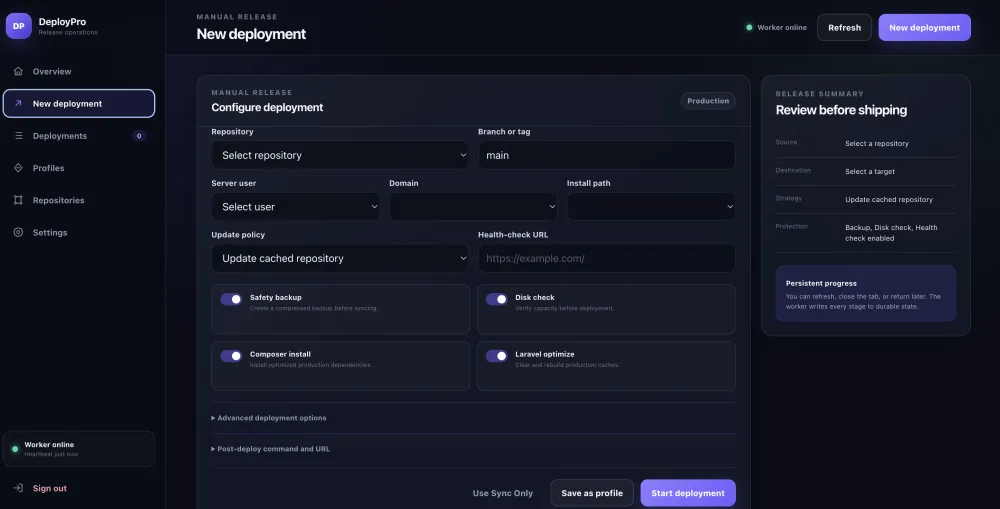
Brightery Deploy Pro is a self-hosted deployment control panel created by Brightery to make production releases easier to follow, repeat, audit, and automate. It connects GitHub push events with CloudPanel-style Linux servers while keeping deployment progress, logs, profiles, notifications, and operational controls in one secure dashboard.
The public source repository is available on GitHub under the Brightery organization. Server administrators and software teams can review the project structure, follow the installation guide, report issues, and track future improvements directly from the repository.
Why Brightery Built Deploy Pro
A deployment may look simple from the outside: pull the latest code, synchronize files, run dependencies, clear caches, and verify the website. In real production environments, however, every one of those steps can fail differently.
A Git repository may be temporarily unavailable. A branch may be wrong. Composer can resolve dependencies against an unexpected PHP platform. A file synchronization process may overwrite persistent uploads. A second deployment service may still be running. A browser refresh may hide the status of a long-running job. A deployment may complete technically while the public website still returns an error.
Brightery Deploy Pro was built to solve those operational gaps with a visible and durable deployment process. Instead of treating a release as one hidden shell command, the platform records it as a structured job with a status, percentage, stage, timestamps, logs, target, repository, branch, options, and final result.
This approach reflects the same strategy-first thinking Brightery applies to custom software development: define the workflow clearly, separate responsibilities, protect persistent data, and make failures diagnosable.
What Is Brightery Deploy Pro?
Brightery Deploy Pro is a PHP dashboard paired with a private Bash deployment worker. The web dashboard is installed inside a protected panel domain, while the privileged deployment engine and runtime data stay outside the public webroot.
The platform is designed primarily for CloudPanel-style server layouts such as:
/home/<site-user>/htdocs/<domain>
From the dashboard, an administrator can create repositories, save reusable deployment profiles, start manual deployments, receive GitHub webhooks, inspect live logs, cancel queued or running jobs, retry previous releases, and monitor the worker.
Brightery Deploy Pro is useful for:
- Digital agencies managing several client websites on one server.
- Software teams deploying PHP, Laravel, JavaScript, or mixed applications.
- Server administrators who want a visual deployment history.
- Businesses that prefer self-hosted infrastructure and controlled credentials.
- Teams migrating away from unstructured cron jobs or one-off deployment scripts.
The Main Features
1. Refresh-Safe Deployment Progress
One of the core features of Brightery Deploy Pro is durable job state. The deployment percentage and current stage are not stored only in browser memory or inferred from a live terminal connection.
Each job writes structured state to the private runtime. When the browser is refreshed, closed, or opened from another session, the dashboard retrieves the same job and continues displaying its progress.
A deployment can move through stages such as:
- Queued
- Validation
- Safety backup
- Repository preparation
- File synchronization
- Dependency installation
- Framework tasks
- Health check
- Completed, failed, or cancelled
This makes the deployment process easier to understand and significantly reduces the ambiguity caused by a blank terminal or a disconnected browser tab.
2. GitHub Push Webhooks
Brightery Deploy Pro can automatically start a deployment after a matching push from GitHub.
Each saved deployment profile can generate an incoming webhook URL such as:
- https://panel.example.com/webhook.php?profile=profile_xxxxxxxxxxxxxxxxxxxx
The administrator adds that URL to the GitHub repository under Settings → Webhooks and configures the same secret in both GitHub and Brightery Deploy Pro.
The flow becomes:
- Developer pushes code ↓ GitHub sends a signed webhook ↓ Brightery Deploy Pro validates the request ↓ Repository and branch are matched ↓ A deployment job is queued automatically
GitHub documents that webhook receivers should verify the X-Hub-Signature-256 header using the configured secret. Brightery Deploy Pro performs that HMAC SHA-256 verification before accepting a deployment trigger. It also tracks GitHub delivery IDs to reduce duplicate processing.
Profiles can be configured for supported events including:
- Push
- Completed workflow run
- Published release
- Repository dispatch
For production environments, triggering after a successful workflow run can provide an additional quality gate between a code push and a release.
3. Repository and Branch Validation
A webhook URL alone is not enough to start an arbitrary deployment. Brightery Deploy Pro compares the incoming GitHub repository and event branch against the selected profile.
This prevents a valid webhook secret from being reused to deploy the wrong repository or branch. It also means teams can maintain separate profiles for main, staging branches, or different domains.
4. Reusable Deployment Profiles
A profile stores the choices required for a repeatable release:
- Repository
- Branch
- CloudPanel user
- Target domain
- Relative target path
- Persistent paths
- Backup preference
- Composer and npm steps
- Laravel actions
- Health check URL
- Post-deploy command
- Callback URL
- Notification behavior
- GitHub webhook rules
Instead of rebuilding those selections every time, the administrator can run the same audited profile manually or trigger it from GitHub.
5. Sync Only Mode
Not every release needs Composer, npm, migrations, backups, or framework optimization. Brightery Deploy Pro includes a Sync Only mode that disables optional processing and focuses on repository preparation plus file synchronization.
This is useful for static assets, simple PHP projects, emergency file synchronization, or applications whose dependencies are built elsewhere.
6. Safer File Synchronization
Deployments can preserve runtime paths that should not be deleted or overwritten, including:
- .env storage uploads public/uploads node_modules
The exact paths should be reviewed for every website. A Laravel application, ecommerce platform, CMS, or custom portal may store persistent files in different directories.
Target paths are restricted to the selected CloudPanel user's htdocs directory. This reduces the risk of an incorrect profile synchronizing files into an unrelated server path.
7. Deployment Locks
Two releases writing to the same website at the same time can corrupt files or produce an unpredictable final state. Brightery Deploy Pro uses target locks to prevent simultaneous jobs from deploying to the same target.
Repository caches are also locked while being prepared. This protects shared Git operations when multiple profiles use the same repository.
8. Optional Backups and Health Checks
A profile can create a safety backup before synchronization. Backup retention can be configured to prevent uncontrolled storage growth.
After deployment, Brightery Deploy Pro can request the public website URL and treat an acceptable HTTP response as a successful health check. A release that completes all shell steps but produces an unhealthy website can therefore be identified immediately.
9. Composer, npm, and Laravel Tasks
Depending on the project, Brightery Deploy Pro can run:
- Composer production dependency installation
- npm installation
- Frontend asset builds
- Laravel cache clearing and optimization
- Laravel migrations
- Laravel maintenance mode
Each option is explicit. Teams that only need file synchronization can leave them disabled.
10. Post-Deploy Commands
A profile can run a controlled command after successful synchronization. The command runs as the target website user rather than root.
Common examples include:
- php artisan queue:restart php artisan storage:link || true php artisan cache:clear
The timeout and failure behavior are configurable, so a post-deploy command can either fail the deployment or produce a warning.
11. Signed Callback URLs
Brightery Deploy Pro can send a JSON callback to another application after deployment. This can notify a CRM, service desk, monitoring system, internal dashboard, or release orchestration service.
When a callback secret is configured, the payload includes an HMAC signature. The receiving application can verify that the callback came from the deployment server and was not modified in transit.
12. Notifications
Teams can configure deployment notifications through supported channels such as Telegram, WhatsApp, and email. Notifications may report successful, failed, or cancelled releases and include useful deployment context.
13. Deployment History and Diagnostics
Every deployment becomes part of an operational history. Administrators can search or filter jobs, inspect details, retry a release, and read log tails.
The included command-line diagnostic tool can verify worker status, runtime paths, JSON files, permissions, queue state, disk space, and recent failed jobs:
- deploypro-doctor --jobs
Architecture and Security Model
Brightery Deploy Pro separates the public panel from the private worker.
- Public HTTPS panel /home/PANEL_USER/htdocs/panel.example.com Private worker /opt/deploypro/engine Private application configuration /var/lib/deploypro/app Private jobs and logs /var/lib/deploypro/jobs Repository cache /var/cache/deploypro/repos Runtime locks /run/deploypro
Only dashboard files are installed into the public webroot. Credentials, structured jobs, logs, webhook deliveries, and privileged scripts remain outside it.
Security controls include:
- Password hashing
- CSRF protection
- Login throttling
- Strict session cookies
- Security headers
- Webhook HMAC verification
- Branch and repository matching
- Duplicate delivery protection
- Target path confinement
- Restricted runtime permissions
- Execution of post-deploy commands as the target website user
The panel should still be protected with HTTPS and, where practical, an IP allowlist, VPN, or access-control proxy.
Installing Brightery Deploy Pro
The latest source and installation documentation are available in the Brightery Deploy Pro GitHub repository.
Create the panel domain in CloudPanel first. Then connect to the server as root and clone the repository outside the website directory:
- cd /root git clone https://github.com/Brightery/brgithery-deploy-pro.git deploypro-premium cd deploypro-premium
Run the installer with the panel webroot, CloudPanel site user, and administrator email:
- PANEL_WEB_ROOT='/home/PANEL_USER/htdocs/panel.example.com' \ WEB_USER='PANEL_USER' \ ADMIN_USER='[email protected]' \ bash ./install.sh
The installer prompts for a secure administrator password, installs the required dependencies, configures the private runtime, installs the worker service, publishes the web dashboard, and starts DeployPro.
Verify the result:
- systemctl status deploypro --no-pager -l deploypro-doctor --jobs
Before installing, teams should audit old deployment services, systemd units, timers, and cron jobs. Running two deployment daemons for the same sites can produce duplicate or conflicting releases.
Configuring GitHub Automatic Deployment
After installation:
- Sign in to Brightery Deploy Pro.
- Add the Git repository.
- Create a deployment profile.
- Select the target CloudPanel user and domain.
- Enable GitHub automatic deployment.
- Select the Push event.
- Generate and save a webhook secret.
- Copy the Payload URL.
- Open the GitHub repository settings.
- Add a webhook using application/json.
- Paste the same secret.
- Enable SSL verification.
- Push a test commit to the matching branch.
GitHub's Recent Deliveries screen can be used to inspect request and response details. Brightery Deploy Pro also records webhook delivery information in its private runtime.
Who Should Use Brightery Deploy Pro?
Brightery Deploy Pro is a strong fit for teams that:
- Host several applications on CloudPanel.
- Need an internal deployment dashboard.
- Want GitHub push-to-deploy without exposing SSH credentials in repository workflows.
- Need persistent progress after browser refresh.
- Prefer reusable deployment profiles over handwritten commands.
- Need a visible history for troubleshooting and accountability.
- Want notifications and post-deploy integrations.
It may not replace container orchestration, immutable infrastructure, or enterprise deployment platforms in every environment. Its purpose is to provide a practical, understandable release workflow for conventional Linux and CloudPanel hosting.
How Brightery Deploy Pro Supports Better Software Operations
Deployment is part of the software lifecycle, not an isolated final step. A maintainable release process depends on planning, access control, validation, visibility, and clear ownership.
Brightery's approach to software development project management emphasizes planning, risk management, quality assurance, communication, and progress tracking. Brightery Deploy Pro applies those ideas to the release stage by turning deployment activity into observable jobs rather than undocumented server actions.
For organizations building customer portals, ecommerce systems, internal platforms, or custom SaaS products, a reliable deployment process also protects the value created during web development. Code quality matters, but production delivery determines whether users receive that quality safely.
Contributing and Following the Project
The public repository provides:
- Source code
- Installation and upgrade documentation
- GitHub webhook instructions
- Troubleshooting guidance
- Architecture notes
- Issue templates
- Validation workflows
- Release packaging tools
Visit Brightery Deploy Pro on GitHub to follow updates, review the code, report a reproducible bug, or suggest a useful feature.
Frequently Asked Questions
Is Brightery Deploy Pro hosted or self-hosted?
Brightery Deploy Pro is self-hosted. The dashboard and deployment worker run on a server controlled by the administrator.
Does it support automatic deployment after a GitHub push?
Yes. A saved profile can expose a signed incoming webhook URL. When GitHub sends a matching push event, Brightery Deploy Pro verifies the signature, repository, branch, event, and delivery ID before creating a deployment job.
Does the browser need to remain open during deployment?
No. The worker runs independently from the browser, and job progress is stored in the private runtime. Refreshing or reopening the dashboard restores the deployment state.
Can it perform only a file sync?
Yes. Sync Only mode disables optional backup, dependency, framework, migration, and health-check actions.
Can it run Composer and Laravel commands?
Yes. Composer installation, Laravel optimization, migrations, maintenance mode, and other actions can be enabled per profile.
Can it run a command after deployment?
Yes. A controlled post-deploy command can run as the target website user with a configurable timeout and failure policy.
Can another application receive deployment results?
Yes. Brightery Deploy Pro can send a signed JSON callback after a deployment.
Where are credentials and logs stored?
They are stored outside the public webroot under private runtime directories such as /var/lib/deploypro and /etc/deploypro.
Is the GitHub repository public?
Yes. The project repository is available at github.com/Brightery/brgithery-deploy-pro. Review the included license before copying, modifying, or redistributing the software.
Final Thoughts
Brightery Deploy Pro gives software teams a clearer path from source control to a running production website. It combines manual control with GitHub automation, persistent progress, reusable profiles, private runtime data, deployment history, and post-release integrations.
The project is especially valuable for CloudPanel environments where one administrator manages several website users and needs a deployment process that is visible without placing privileged scripts inside the public webroot.
Explore the source, installation guide, and latest updates in the official Brightery Deploy Pro GitHub repository. For custom deployment automation, server workflows, dashboards, and business software, contact Brightery.
Explore Brightery Deploy Pro
Review the source code, installation documentation, releases, and future updates in the official Brightery Deploy Pro GitHub repository . For custom deployment automation, server workflows, dashboards, and business software, contact Brightery.
0 Responses
Share your perspective and continue the conversation.
No responses yet
Be the first to share your thoughts.
Join the conversation