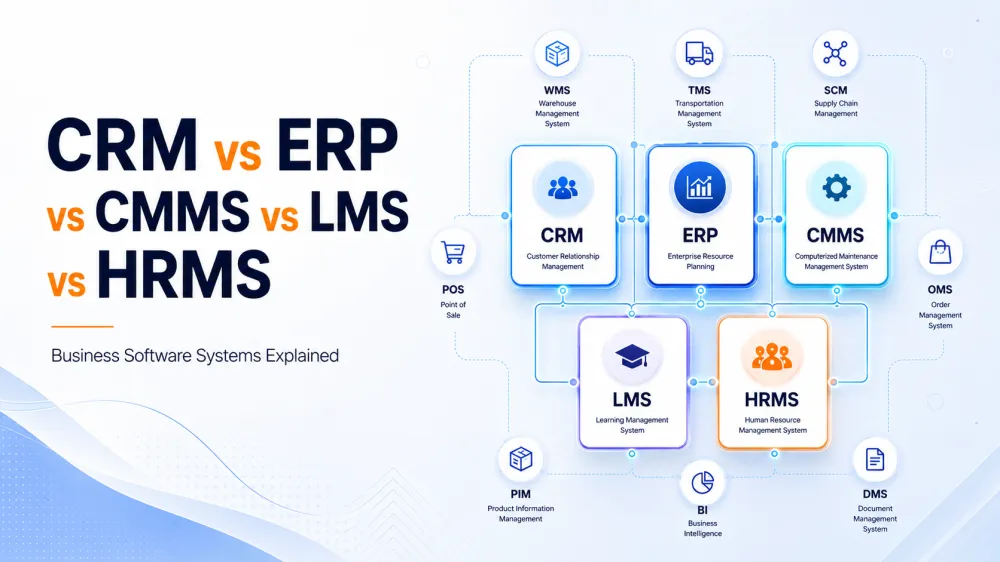
CRM vs ERP vs CMMS vs LMS vs HRMS can sound like alphabet soup when a company first begins searching for business software.
Then the list becomes even longer.
WMS. TMS. HCM. HRIS. EAM. SCM. OMS. PIM. PLM. FSM. DMS. BPM. BI.
What are all these systems?
Do you need one of them?
Several of them?
Or should everything simply be included inside one ERP?
The confusion happens because modern businesses use different software systems to manage different parts of the organization.
A CRM primarily manages customers and sales.
An ERP primarily manages company operations and resources.
A CMMS primarily manages maintenance.
An LMS manages learning and training.
An HRMS manages employees and HR processes.
But those are only the beginning.
A growing company may eventually use specialized software for warehouses, transportation, product information, field technicians, assets, documents, analytics, orders and supply-chain operations.
The important question is not how many acronyms you know.
It is:
Which business processes need software, which systems should be integrated, and which functions should remain specialized?
This guide explains the major categories in plain business language.
Business Software Systems at a Glance
| Acronym | Full Name | Main Purpose |
|---|---|---|
| CRM | Customer Relationship Management | Customers, leads and sales |
| ERP | Enterprise Resource Planning | Company-wide operations |
| CMMS | Computerized Maintenance Management System | Maintenance and work orders |
| LMS | Learning Management System | Training and education |
| HRMS | Human Resources Management System | Employees and HR |
| HRIS | Human Resources Information System | Core HR information |
| HCM | Human Capital Management | Workforce and talent |
| EAM | Enterprise Asset Management | Asset lifecycle |
| WMS | Warehouse Management System | Warehouse operations |
| TMS | Transportation Management System | Transportation and freight |
| SCM | Supply Chain Management | End-to-end supply chain |
| POS | Point of Sale | Retail transactions |
| OMS | Order Management System | Orders and fulfillment |
| PIM | Product Information Management | Product information |
| PLM | Product Lifecycle Management | Product development lifecycle |
| FSM | Field Service Management | Field technicians and services |
| DMS | Document Management System | Documents and records |
| CMS | Content Management System | Website and digital content |
| BPM | Business Process Management | Workflows and approvals |
| BI | Business Intelligence | Analytics and dashboards |
There can be overlap between these categories.
Some ERP platforms, for example, include CRM, HR, inventory and project-management modules.
Likewise, the exact distinction between terms such as HRIS, HRMS and HCM varies between software vendors.
It is therefore more useful to understand the business problem each category is designed to solve than to become overly focused on the label.
1. What Is CRM?
CRM stands for Customer Relationship Management.
A CRM manages interactions and relationships with prospective and existing customers.
Its strongest users are usually:
- Sales teams
- Business-development teams
- Marketing teams
- Account managers
- Customer-service teams
A CRM may contain:
- Leads
- Contacts
- Companies
- Opportunities
- Calls
- Emails
- Meetings
- WhatsApp conversations
- Follow-up activities
- Sales pipelines
- Quotations
- Customer history
- Marketing sources
- Sales forecasts
A typical CRM workflow could look like this:
Facebook Lead → CRM → Salesperson Assigned → Call → Meeting → Proposal → Follow-Up → Deal Won
The CRM should give management visibility into questions such as:
- How many leads arrived this week?
- Which campaign generated them?
- Who is responsible for each lead?
- When was each customer contacted?
- What is the expected pipeline value?
- Why are deals being lost?
Salesforce describes CRM as technology for managing company interactions with current and potential customers, bringing customer information and activity together in one environment.
When Do You Need CRM?
You probably need CRM when your company repeatedly asks:
Who spoke to this customer?
Did anyone follow up?
Where did this lead come from?
Who owns this opportunity?
What is expected to close this month?
Brightery has a dedicated guide explaining CRM development and implementation.
2. What Is ERP?
ERP stands for Enterprise Resource Planning.
ERP is broader than CRM.
It connects major operational areas of an organization and provides a more unified view of company resources.
Oracle describes ERP as a system connecting major business functions such as finance, accounting, procurement, supply chain and other operational processes.
Typical ERP modules can include:
- Accounting
- Finance
- Procurement
- Purchasing
- Sales orders
- Inventory
- Warehousing
- Manufacturing
- Projects
- Expenses
- Assets
- Human resources
- Reporting
A basic ERP workflow may look like:
Customer Order → Stock Reservation → Warehouse → Delivery → Invoice → Payment → Accounting
CRM vs ERP: The Simplest Difference
A useful mental model is:
CRM helps manage the relationship that creates the sale.
ERP helps manage much of the operation required to deliver and account for that sale.
For example:
CRM
Opportunity becomes Won.
↓
ERP
Customer created.
↓
Sales order generated.
↓
Inventory reserved.
↓
Goods delivered.
↓
Invoice issued.
↓
Payment recorded.
That is why many companies eventually benefit from ERP integration with CRM.
Brightery also has a dedicated guide explaining the difference between CRM and ERP.
3. What Is CMMS?
CMMS stands for Computerized Maintenance Management System.
CMMS software is designed around maintenance operations.
It is particularly useful for organizations responsible for physical equipment, facilities, machinery or vehicles.
Industries that commonly need maintenance-management software include:
- Manufacturing
- Hospitality
- Hospitals
- Facility management
- Property management
- Oil and gas
- Utilities
- Transportation
- Construction
- Warehousing
A CMMS can manage:
- Assets
- Machines
- Equipment
- Maintenance schedules
- Work orders
- Preventive maintenance
- Breakdowns
- Technicians
- Spare parts
- Maintenance history
- Inspections
- Downtime
Example
Imagine a hotel managing 20 elevators, 400 air-conditioning units, generators, pumps and kitchen equipment.
Instead of keeping maintenance information in Excel, the CMMS could record:
Asset: Elevator 14
Location: Building A
Last Service: August 1
Next Service: September 1
Technician: Ahmed
Open Work Order: WO-10492
Required Part: Door Sensor
Management can then see:
- Which assets require maintenance
- Which work orders are overdue
- Which machines fail frequently
- What spare parts are needed
- How much maintenance costs
- Which technicians are overloaded
CMMS vs ERP
ERP may record the financial and purchasing side of maintenance.
CMMS manages the maintenance operation itself.
For example:
CMMS detects that a machine requires a replacement bearing.
↓
ERP creates or manages the purchasing process.
↓
Supplier delivers the part.
↓
CMMS technician installs it.
↓
ERP records the expense.
This is a perfect example of two systems serving different purposes while exchanging information.
4. What Is EAM?
EAM stands for Enterprise Asset Management.
EAM and CMMS are closely related, which causes considerable confusion.
A simple distinction is:
CMMS focuses heavily on maintaining assets.
EAM focuses on managing the entire lifecycle and performance of assets.
An EAM may cover:
- Asset acquisition
- Installation
- Location
- Maintenance
- Condition
- Operating cost
- Performance
- Compliance
- Depreciation
- Replacement
- Disposal
CMMS vs EAM Example
Suppose a construction company owns a crane.
The CMMS asks:
- When is the crane's next service?
- Which technician is assigned?
- Which replacement parts are required?
- How many failures occurred?
The EAM may additionally ask:
- How much did the crane cost?
- What is its remaining useful life?
- What is its total maintenance cost?
- What is its utilization?
- Should we repair or replace it?
- What is its financial and operational value?
Large asset-intensive organizations may require an EAM rather than only maintenance scheduling.
5. What Is LMS?
LMS stands for Learning Management System.
An LMS manages education, training and learning content.
Moodle describes an LMS as software used to create, manage, organize and deliver learning experiences.
An LMS may manage:
- Courses
- Lessons
- Videos
- Teachers
- Trainers
- Students
- Employees
- Exams
- Quizzes
- Certifications
- Training progress
- Attendance
- Learning history
Corporate LMS Example
A construction company may require employees to complete:
- Workplace Safety
- Equipment Operation
- Cybersecurity Awareness
- First Aid
- Compliance Training
The LMS can record:
Employee: Omar Hassan
Workplace Safety — Completed
Cybersecurity — Completed
Equipment Safety — 80%
First Aid Certification — Expires December
The system can automatically remind Omar and his manager before the certification expires.
Who Needs an LMS?
Common users include:
- Universities
- Schools
- Training centers
- Corporations
- Government organizations
- Healthcare companies
- Compliance-heavy industries
Brightery already provides custom Learning Management System development as part of its custom software services.
6. What Is HRMS?
HRMS stands for Human Resources Management System.
HRMS software manages employee-related processes.
Oracle describes HRMS as software used to manage internal HR functions including employee information, payroll, recruitment, benefits, training, talent management and attendance.
Typical HRMS capabilities include:
- Employee profiles
- Contracts
- Attendance
- Leave
- Payroll
- Recruitment
- Onboarding
- Benefits
- Performance reviews
- Employee documents
- Offboarding
Example HRMS Workflow
A new employee joins.
↓
Employee record created.
↓
Contract uploaded.
↓
Department assigned.
↓
Salary configured.
↓
Attendance activated.
↓
Manager assigned.
↓
Onboarding checklist launched.
↓
Training assigned.
All of these processes can happen through the HRMS.
HRIS vs HRMS vs HCM: What Is the Difference?
These terms often overlap, and vendors do not always use them consistently.
Broadly:
HRIS — Human Resources Information System
Historically focused on core HR information such as:
- Employee records
- Payroll
- Attendance
- Benefits
- Leave
- HR administration
HRMS — Human Resources Management System
Often includes the HRIS foundation plus broader HR-management capabilities:
- Recruitment
- Performance
- Training
- Workforce administration
- Employee engagement
HCM — Human Capital Management
Often represents the widest workforce-management concept.
It may include:
- Core HR
- Recruitment
- Talent management
- Compensation
- Performance
- Succession planning
- Workforce planning
- Workforce analytics
- Employee experience
Oracle notes that HRIS, HRMS and HCM terminology has evolved and overlaps considerably.
So when buying software, do not ask only:
Is this an HCM or HRMS?
Ask:
Does it support payroll, recruitment, attendance, performance, onboarding and the other processes our organization actually needs?
7. What Is WMS?
WMS stands for Warehouse Management System.
A WMS manages what happens inside the warehouse.
SAP defines WMS as software used to manage and control daily warehouse operations from the arrival of goods until they leave the warehouse.
A WMS can manage:
- Receiving
- Putaway
- Warehouse locations
- Bins
- Picking
- Packing
- Barcode scanning
- Transfers
- Cycle counts
- Stock movement
- Dispatch preparation
ERP Inventory vs WMS
This distinction is extremely important.
ERP might know:
We have 5,000 units of Product A.
WMS knows:
2,000 units are in Warehouse A.
1,500 units are in Warehouse B.
500 are reserved.
300 are in Zone C → Rack 14 → Bin B.
700 are awaiting quality inspection.
WMS provides much deeper warehouse-floor visibility.
Typical Integration
ERP sends an order to WMS.
↓
WMS determines where the products are stored.
↓
Warehouse employees pick and pack the order.
↓
WMS confirms completion.
↓
ERP receives the updated stock and order status.
For retailers, Brightery's Retail ERP System guide explores the larger relationship between retail operations, inventory and enterprise systems.
8. What Is TMS?
TMS stands for Transportation Management System.
A TMS manages the transportation of goods.
Oracle defines a TMS as technology used to plan, execute and optimize the physical movement of incoming and outgoing goods.
A TMS can manage:
- Deliveries
- Routes
- Carriers
- Freight costs
- Vehicles
- Drivers
- Transport planning
- Shipment tracking
- Documentation
- Freight settlement
- Delivery schedules
WMS vs TMS
Think of it this way:
WMS: What happens inside the warehouse?
TMS: How do the goods move between locations?
Example:
WMS:
Order packed.
↓
TMS:
Carrier selected.
↓
Route planned.
↓
Shipment dispatched.
↓
Delivery tracked.
↓
Customer receives goods.
9. What Is SCM?
SCM stands for Supply Chain Management.
SCM is broader than WMS or TMS.
It can cover the entire flow of goods and information from suppliers to customers.
For example:
Supplier → Procurement → Manufacturing → Warehouse → Transportation → Retailer → Customer
Supply-chain systems may cover:
- Procurement
- Supplier management
- Demand planning
- Supply planning
- Manufacturing
- Inventory
- Warehousing
- Logistics
- Transportation
- Distribution
SCM vs ERP
ERP manages broad internal company resources and transactions.
SCM specializes more deeply in the movement and planning of products across the supply chain.
The systems frequently work together.
A company with a sophisticated supply chain may have:
ERP + SCM + WMS + TMS
instead of expecting one application to perform every logistics function equally well.
10. What Is POS?
POS stands for Point of Sale.
POS software manages the point at which customers complete purchases.
Common environments include:
- Retail stores
- Restaurants
- Cafés
- Salons
- Pharmacies
- Supermarkets
A POS may manage:
- Products
- Prices
- Discounts
- Cashiers
- Receipts
- Payments
- Returns
- Customer information
- Stock deductions
- Loyalty
Example
Customer buys three products.
↓
Cashier scans them.
↓
POS checks the prices.
↓
Discount is applied.
↓
Customer pays.
↓
Receipt generated.
↓
Inventory reduced.
↓
Transaction sent to accounting.
Modern retailers often connect:
POS + Ecommerce + ERP + CRM + WMS
This creates an omnichannel operation rather than separate online and physical businesses.
11. What Is OMS?
OMS stands for Order Management System.
An OMS manages orders across sales channels and fulfillment operations.
Imagine a retailer selling through:
- Ecommerce website
- Mobile app
- Amazon
- Physical branches
- B2B portal
- Call center
An OMS can bring those orders together.
Typical functionality includes:
- Order capture
- Order status
- Inventory allocation
- Fulfillment routing
- Split shipments
- Cancellations
- Returns
- Exchanges
- Backorders
Ecommerce Platform vs OMS
Shopify, WooCommerce or Magento may create the order.
OMS decides what happens to the order across a more complicated fulfillment network.
Example:
Customer orders online.
↓
OMS checks available inventory.
↓
Closest warehouse selected.
↓
WMS receives fulfillment instruction.
↓
TMS arranges delivery.
↓
ERP records the transaction.
For growing ecommerce operations, read Brightery's Ecommerce ERP Software guide.
12. What Is PIM?
PIM stands for Product Information Management.
PIM manages product information.
It is particularly useful for companies with large catalogs or products distributed across several channels.
PIM may contain:
- Product name
- Arabic name
- English name
- Description
- Specifications
- Dimensions
- Brand
- Images
- Videos
- Technical documents
- SEO information
- Marketplace attributes
Example
A distributor manages 40,000 products.
Those products appear on:
- Company website
- Mobile app
- Amazon
- B2B portal
- Printed catalog
- Dealer portal
Instead of maintaining product information separately in every channel, PIM becomes the central source.
PIM → Website
PIM → Mobile App
PIM → Marketplace
PIM → Dealer Portal
This greatly reduces inconsistent product information.
13. What Is PLM?
PLM stands for Product Lifecycle Management.
PLM manages the process of designing and developing products.
Typical industries include:
- Manufacturing
- Automotive
- Electronics
- Aerospace
- Fashion
- Engineering
PLM can manage:
Product Idea → Design → Prototype → Testing → Manufacturing → Revision → Retirement
Typical data includes:
- Designs
- Engineering documents
- Bills of materials
- Product revisions
- Specifications
- Approvals
- Testing
- Product changes
PLM vs PIM
This is an easy distinction to remember:
PLM manages creating the product.
PIM manages information used to describe and distribute the product.
14. What Is FSM?
FSM stands for Field Service Management.
FSM manages employees performing work outside the office.
Examples include:
- HVAC technicians
- Maintenance engineers
- Telecom installers
- Cleaning teams
- Pest-control teams
- Medical-equipment technicians
- Utility workers
FSM typically manages:
- Service requests
- Technician assignment
- Scheduling
- Routes
- GPS/location
- Job status
- Customer signatures
- Photos
- Parts used
- Service reports
- Invoices
Example
Customer reports broken AC.
↓
Ticket created.
↓
Nearest technician assigned.
↓
Technician receives mobile notification.
↓
Technician visits customer.
↓
Part replaced.
↓
Customer signs electronically.
↓
Job completed.
↓
Invoice generated.
CMMS and FSM can overlap.
CMMS focuses on maintaining assets.
FSM focuses more on coordinating the people delivering service in the field.
15. What Is DMS?
DMS stands for Document Management System.
A DMS manages documents and records.
It can store:
- Contracts
- Invoices
- Employee documents
- Certificates
- Legal documents
- Policies
- Engineering drawings
- Purchase orders
A good DMS may provide:
- Version control
- Search
- Permissions
- Approval workflows
- Expiration dates
- Audit history
- Digital signatures
- Retention rules
The Classic DMS Problem
Someone asks:
Which contract is the latest version?
And five people send five different files.
That is exactly the kind of problem DMS is intended to solve.
16. What Is CMS?
CMS stands for Content Management System.
CMS should not be confused with CMMS.
A CMS manages digital content.
Typical content includes:
- Website pages
- Blog posts
- News
- Images
- Landing pages
- Videos
WordPress is one well-known example of a CMS.
A CMS answers:
What content appears on our website?
A CMMS answers:
What maintenance does our equipment require?
Only one extra letter separates the acronyms, but the software categories are completely different.
17. What Is BPM?
BPM stands for Business Process Management.
BPM systems focus on workflows and processes.
Instead of belonging to one department, they may coordinate activities across several departments.
Example: Purchase Approval
Employee creates purchase request.
↓
Manager approves.
↓
Finance reviews budget.
↓
Procurement requests supplier quotations.
↓
Purchase order issued.
↓
Goods received.
↓
Finance pays supplier.
A BPM system can automate and monitor this complete process.
Another Example: Employee Onboarding
HR approves employee.
↓
IT creates email account.
↓
Administration prepares desk.
↓
Manager receives onboarding task.
↓
LMS assigns training.
↓
HRMS updates employee status.
BPM becomes the layer coordinating several systems and departments.
18. What Is BI?
BI stands for Business Intelligence.
BI software turns company data into reports, dashboards and management insights.
Instead of running the daily operation itself, BI helps management understand what is happening.
It may combine information from:
- CRM
- ERP
- POS
- HRMS
- Ecommerce
- WMS
- CMMS
- Marketing platforms
CEO Dashboard Example
Revenue: AED 12.4 million
Sales Pipeline: AED 19.7 million
Accounts Receivable: AED 2.1 million
Inventory Value: AED 4.8 million
Employees: 245
Open Maintenance Orders: 31
Website Revenue: AED 3.4 million
The BI platform brings information from multiple systems into one management view.
So What Is the Difference Between CRM, ERP, CMMS, LMS and HRMS?
The simplest answer is:
| System | Main Question |
| CRM | How are we attracting, selling to and serving customers? |
| ERP | How are we running the company's operations and finances? |
| CMMS | How are we maintaining equipment and facilities? |
| LMS | How are we training people? |
| HRMS | How are we managing employees? |
Expand the model:
| System | Main Question |
| EAM | How are we managing physical assets across their lifecycle? |
| WMS | What is happening inside our warehouses? |
| TMS | How are goods being transported? |
| SCM | How is our overall supply chain performing? |
| POS | What is happening at the point of sale? |
| OMS | How are orders being routed and fulfilled? |
| PIM | Where is our authoritative product information? |
| PLM | How are products being designed and developed? |
| FSM | How are field technicians and field jobs managed? |
| DMS | Where are our controlled documents? |
| CMS | How is website content managed? |
| BPM | How do processes move between people and departments? |
| BI | What does all our business data tell management? |
Do You Need All These Business Systems?
Usually not.
A 20-person consultancy probably does not need:
- CRM
- ERP
- WMS
- TMS
- CMMS
- EAM
- PLM
- PIM
- SCM
all as separate products.
That would create unnecessary complexity.
A multinational manufacturer with several factories, warehouses and thousands of employees might legitimately require most of them.
The correct software architecture depends on:
- Company size
- Industry
- Number of employees
- Number of customers
- Product complexity
- Asset complexity
- Warehouse operations
- Supply-chain complexity
- Regulatory requirements
- Geographic scale
Should You Use One ERP for Everything?
Sometimes.
But not always.
Modern ERP systems can contain modules for:
- Finance
- Inventory
- Procurement
- CRM
- HR
- Projects
- Manufacturing
- Assets
For a smaller or moderately complex organization, that can be extremely efficient.
Instead of operating ten systems, the company may use:
One ERP + CRM + HR + Inventory
inside one platform.
However, specialization becomes important as complexity grows.
For example, a large logistics company might need:
- SAP or Oracle ERP
- Specialist WMS
- Specialist TMS
- Salesforce CRM
- Workday HCM
- Power BI
because each function is important enough to justify specialist software.
Best-of-Breed vs All-in-One Software
This creates one of the biggest enterprise-software decisions.
All-in-One Approach
One large platform manages several business functions.
Advantages
- Fewer integrations
- One vendor
- Shared data
- Easier administration
- Potentially lower complexity
Disadvantages
- Some modules may be weaker
- Greater vendor dependency
- Harder to replace one component
- Customization can become complicated
Best-of-Breed Approach
Select the strongest specialist software for each function.
For example:
Salesforce → CRM
SAP → ERP
Workday → HCM
IBM Maximo → EAM
Moodle → LMS
Power BI → Analytics
Advantages
- Strong specialized functionality
- More freedom to select tools
- Departments receive purpose-built systems
Disadvantages
- More integrations
- More vendors
- Greater architecture complexity
- More data synchronization
- Higher governance requirements
Integration Is Often More Important Than the Individual Software
Buying good software does not automatically create a good digital business.
The systems must communicate.
Imagine this architecture:
Marketing
↓
CRM
Lead captured and customer won.
↓
ERP
Customer, order and invoice created.
↓
WMS
Warehouse receives fulfillment request.
↓
TMS
Shipment scheduled.
↓
Customer
Delivery completed.
Meanwhile:
HRMS manages employees.
LMS manages employee training.
CMMS/EAM manages equipment.
DMS manages controlled documents.
BI brings information from all systems into management dashboards.
This is what digital transformation increasingly looks like.
The objective is not to buy more software.
It is to create a connected operating environment.
Example 1: Software Systems for a Retail Company
A large retailer could use:
| Requirement | System |
| Customer relationships | CRM |
| Finance | ERP |
| Retail checkout | POS |
| Online orders | OMS |
| Warehouse | WMS |
| Delivery | TMS |
| Product data | PIM |
| Employees | HRMS |
| Employee training | LMS |
| Store equipment | CMMS |
| Analytics | BI |
The architecture might look like:
Customer → Ecommerce/POS → CRM/OMS → ERP → WMS → TMS
with BI collecting data from all systems.
Example 2: Software Systems for a Construction Company
A construction company may need:
| Requirement | System |
| Sales opportunities | CRM |
| Finance and purchasing | ERP |
| Employees | HRMS |
| Safety training | LMS |
| Heavy machinery | EAM |
| Equipment maintenance | CMMS |
| Field engineers | FSM |
| Drawings and contracts | DMS |
| Procurement and suppliers | SCM |
| Management dashboards | BI |
This is why trying to run a complex construction company entirely through spreadsheets becomes increasingly risky.
Example 3: Software Systems for a Hospital
A hospital could use:
| Requirement | System |
| Customer/patient relationship functions | CRM |
| Finance and purchasing | ERP |
| Employees | HRMS |
| Staff training | LMS |
| Medical equipment | EAM / CMMS |
| Supplies | WMS |
| Documents | DMS |
| Field/home services | FSM |
| Executive reporting | BI |
Healthcare systems can also require specialized clinical software that sits outside these general categories.
Example 4: Software Systems for a University
A university may use:
| Requirement | System |
| Student recruitment | CRM |
| Finance | ERP |
| Employees | HRMS |
| Online education | LMS |
| Buildings and facilities | CMMS |
| Documents | DMS |
| Website | CMS |
| Reporting | BI |
CRM and LMS solve completely different problems even though both may contain information about the same person.
A prospective student may begin in CRM.
After enrollment, learning activity occurs in the LMS.
Example 5: Software Systems for an Ecommerce Company
A large ecommerce operation might use:
- CRM for customers
- ERP for finance and purchasing
- Ecommerce platform for storefront
- OMS for orders
- WMS for warehouses
- TMS for deliveries
- PIM for product information
- HRMS for staff
- BI for analytics
This is why large ecommerce companies eventually need more than just Shopify, WooCommerce or Magento.
The storefront is only one part of the technology architecture.
Which Business Software Does Your Company Need?
Use the problem as your starting point.
“We keep losing leads.”
You probably need CRM.
“Finance, purchasing and inventory are disconnected.”
You probably need ERP.
“Equipment keeps breaking and maintenance is reactive.”
You probably need CMMS.
“We cannot track employee training.”
You probably need LMS.
“HR manages everything in Excel.”
You probably need HRMS/HRIS/HCM.
“Warehouse employees cannot locate stock efficiently.”
You probably need WMS.
“Transportation costs and routes are difficult to control.”
You probably need TMS.
“We sell from five channels and orders are becoming chaotic.”
You may need OMS.
“Product information is inconsistent across channels.”
You probably need PIM.
“We manufacture complex products and cannot control revisions.”
You may need PLM.
“Our technicians work in the field and scheduling is chaotic.”
You probably need FSM.
“Nobody knows which document version is correct.”
You probably need DMS.
“Management cannot see what is happening across departments.”
You probably need BI.
“Approvals disappear between departments.”
You may need BPM/workflow automation.
When Should You Build Custom Business Software?
Not every company should build custom software.
Established platforms may already solve the problem.
Custom development becomes more attractive when:
- Your workflow is unusual
- Several systems need to behave as one
- Existing platforms require too many workarounds
- Your business logic creates competitive advantage
- Specialized permissions are required
- Integration requirements are extensive
- You want complete control of the product roadmap
Brightery's custom software development services are designed around these types of requirements.
A custom platform can also combine several categories.
For example, instead of purchasing separate CRM, ERP, CMMS and FSM products, a field-maintenance company might build one system containing:
CRM
Customers and service contracts.
ERP
Invoices and purchasing.
CMMS
Customer equipment and maintenance schedules.
FSM
Technician scheduling and mobile field jobs.
BI
Management dashboards.
That may create a considerably cleaner workflow than forcing employees to work across four disconnected applications.
Before Buying Software, Map the Business First
A common mistake is starting with software demonstrations.
Instead, document:
Processes
How does work actually move through the company?
People
Who performs each activity?
Data
Which information does each department require?
Problems
Where are delays, duplicate entry and errors occurring?
Integrations
Which existing systems must remain?
Reporting
What does management need to see?
Growth
How will requirements change over three to five years?
Only then should you decide whether the company needs:
- CRM
- ERP
- CMMS
- LMS
- HRMS
- Specialist software
- Custom software
- Or an integrated combination
The Future Is Not More Software—It Is Better Connected Software
Businesses spent years purchasing applications department by department.
Sales bought CRM.
HR bought HRMS.
Operations bought ERP.
Maintenance bought CMMS.
Training bought LMS.
Warehouse bought WMS.
Management bought BI.
The result was often a new problem:
software silos.
The next stage of business technology is connecting those systems properly.
A customer should not exist as six different records.
An employee leaving the company should not require manual access removal from ten platforms.
A completed sale should not need to be retyped into accounting.
A machine failure should not require maintenance staff to email procurement manually.
The systems should exchange information intelligently.
That is where APIs, workflow automation, integration platforms and custom software become increasingly valuable.
Brightery's guide to ERP and CRM integration provides one practical example of how that integration works.
How Brightery Approaches Business Software
Brightery approaches software from the business process first.
The question is not:
Which software product can we sell you?
The questions are:
- What are you trying to improve?
- Which employees are involved?
- Which information moves between them?
- Which systems already exist?
- Which processes should be automated?
- What should management be able to measure?
From there, the solution might involve:
- Existing CRM implementation
- ERP integration
- Custom CRM
- Custom ERP
- LMS
- Warehouse software
- Maintenance software
- Mobile applications
- Business portals
- API integrations
- Workflow automation
- A completely custom enterprise platform
Brightery provides custom software development, including ERP, CRM, LMS, supply-chain systems and other specialized business applications.
Businesses evaluating their wider technology architecture can also read Brightery's Software in Abu Dhabi guide.
Related Brightery Business Software Guides
CRM
ERP and Integration
Custom Software
- Custom Software Development Services
- 13 Custom Software Development Services
- Software Development Agency
- Software in Abu Dhabi
Final Comparison: CRM vs ERP vs CMMS vs LMS vs HRMS and More
The easiest way to remember the major systems is:
CRM = Customers
ERP = Business operations
CMMS = Maintenance
EAM = Assets
LMS = Learning
HRMS/HCM = Employees
WMS = Warehouse
TMS = Transportation
SCM = Supply chain
POS = Retail transactions
OMS = Orders
PIM = Product information
PLM = Product development
FSM = Field service
DMS = Documents
CMS = Website content
BPM = Workflows
BI = Business intelligence
But a modern company should not look at these systems as isolated boxes.
They form a connected digital architecture.
CRM may create the customer.
ERP may process the order.
WMS may fulfill it.
TMS may deliver it.
HRMS manages the people doing the work.
LMS trains them.
CMMS maintains the equipment they use.
BI shows management what is happening across everything.
The objective is not to collect business software. The objective is to create a connected operating system for the company.
Resources
External references are separated here so they can be removed easily before publication.
- Salesforce — What Is CRM?
- Oracle — Enterprise Resource Planning
- Oracle — HRMS
- Oracle — HRIS vs HRMS vs HCM
- Moodle — What Is an LMS?
- SAP — What Is a Warehouse Management System?
- Oracle — What Is a Transportation Management System?
Frequently Asked Questions
What Is the Difference Between CRM and ERP?
CRM primarily manages customers, leads, sales and customer interactions. ERP primarily manages operational areas such as finance, purchasing, inventory, orders and company resources. Many businesses integrate both systems.
What Is the Difference Between ERP and CMMS?
ERP handles broad business operations, while CMMS specializes in maintenance activities such as work orders, preventive maintenance, equipment history and technicians.
What Is the Difference Between CMMS and EAM?
CMMS concentrates heavily on maintenance operations. EAM generally covers the wider lifecycle of physical assets, including acquisition, performance, maintenance, cost and eventual disposal.
What Is the Difference Between LMS and HRMS?
LMS manages education and employee learning. HRMS manages employees, payroll, attendance, leave, recruitment and other HR processes. The two systems can be integrated so HRMS assigns training and LMS reports completion.
What Is the Difference Between HRIS, HRMS and HCM?
The terms overlap. HRIS traditionally focuses on core employee information, HRMS often adds wider HR-management functions, and HCM commonly refers to the broadest workforce and talent-management suite. Exact definitions vary between vendors.
What Is the Difference Between ERP and WMS?
ERP may track overall inventory and business transactions. WMS specializes in detailed warehouse operations, including receiving, bin locations, picking, packing and warehouse movements.
What Is the Difference Between WMS and TMS?
WMS manages the warehouse. TMS manages the physical transportation of goods between locations.
What Is the Difference Between ERP and SCM?
ERP manages broad internal company operations and resources. SCM focuses specifically on the end-to-end supply chain, including suppliers, procurement, planning, inventory, logistics and distribution.
What Is the Difference Between OMS and ERP?
OMS specializes in capturing, routing and fulfilling orders, particularly across several channels. ERP provides a broader operational and financial system that may receive order information from the OMS.
What Is the Difference Between PIM and ERP?
ERP generally manages transactional information such as inventory, pricing, purchasing and orders. PIM manages rich product information such as descriptions, specifications, images and channel-specific product data.
What Is the Difference Between PIM and PLM?
PLM manages the process of creating and developing the product. PIM manages the information used to describe and distribute the finished product across sales channels.
What Is the Difference Between CMS and CMMS?
CMS stands for Content Management System and manages website content. CMMS stands for Computerized Maintenance Management System and manages maintenance operations.
Can One ERP Replace CRM, HRMS, WMS and Other Systems?
Sometimes. Many ERP suites contain modules covering several of these functions. However, companies with complex requirements may receive better functionality from specialist systems integrated with the ERP.
Does a Small Business Need ERP?
Not necessarily. A small company may initially need only accounting, CRM and a few operational tools. ERP becomes more valuable as finance, purchasing, inventory, projects and other business processes become difficult to manage separately.
Should CRM and ERP Be Integrated?
In many businesses, yes. CRM manages customer and sales information while ERP manages operational and financial processes. Integration reduces duplicate entry and improves visibility across sales and operations.
Should LMS Be Integrated With HRMS?
For organizations with significant employee training requirements, integration is valuable. HRMS can identify employees, roles and training requirements while LMS manages courses, assessments and completion records.
How Do I Know Which Business Software My Company Needs?
Map your current workflows, departments, problems, data, integrations and reporting requirements first. Select software based on actual operational needs rather than purchasing systems simply because competitors use them.
Can Brightery Build Custom CRM, ERP, LMS or Other Business Software?
Yes. Brightery develops custom enterprise and business software, including CRM, ERP, LMS, business portals, ecommerce systems, integrations, automation and specialized applications designed around company workflows.
0 Responses
Share your perspective and continue the conversation.
No responses yet
Be the first to share your thoughts.
Join the conversation